Carmen R. Miller
Thoughtful Product Design
← Back
Summary
THE COMPANY
Security Industry Specialists (SIS) is a security company that schedules and manages thousands of personnel across the nation every day.
THE GOAL
I was brought in to take their custom scheduling tool, that had been in R&D for two years, across the finish line—to take the foundational design to a shippable product that could be successful with users.
Product Needs
Problem
- Visual Clutter →The interface was a bit visually 'noisy' so primary actions or information were not immediately clear to the user, increasing cognitive friction.
Solution
- Visual Hierarchy Refine UI visuals, emphasize the highest priority actions, and 'quiet down' the secondary actions to create clear visual hierarchy.
- Missing Components →Components (when they existed) were decentralized and mixed in with the page designs, making it difficult to know what standard building blocks existed and which precedent was most up-to-date.
- Centralized Component Structure Create a local 'component library' page to centralize all dev-ready components into one place, to create a single ‘source of truth’, to ensure clarity in handoff, and to support efficient future updates.
- Lack of Standardization →Critical design building blocks and standardized responsive breakpoints were not established across company products, which lead to redundant work for both Design and Dev, and an inconsistent experience for the user.
- Design System & Best Practices Create a more standardized design system that could be implemented in the current product and retroactively updated across other company tools to create a consistent experience across multiple products.
- Clunky Handoff Process →The system for handing off dev-ready designs was clunky and production designs were mixed in with the designs still in progress, creating status confusion and constant communication redundancy.
- Streamlined Handoff Process Create a clean and updated system for Design-to-Dev handoff with clear phases, sections, and detailed Dev notes. No blending of production-ready designs with works-in-progress.
“Carmen did an excellent job unifying the ...experience into an intuitive tool even for our less technical users. Additionally, she made the next steps as easy on our developers as possible ...creating the smoothest handoff process we’ve ever had.”
Patrick Clark, Director of Technology, SIS — read referral letter
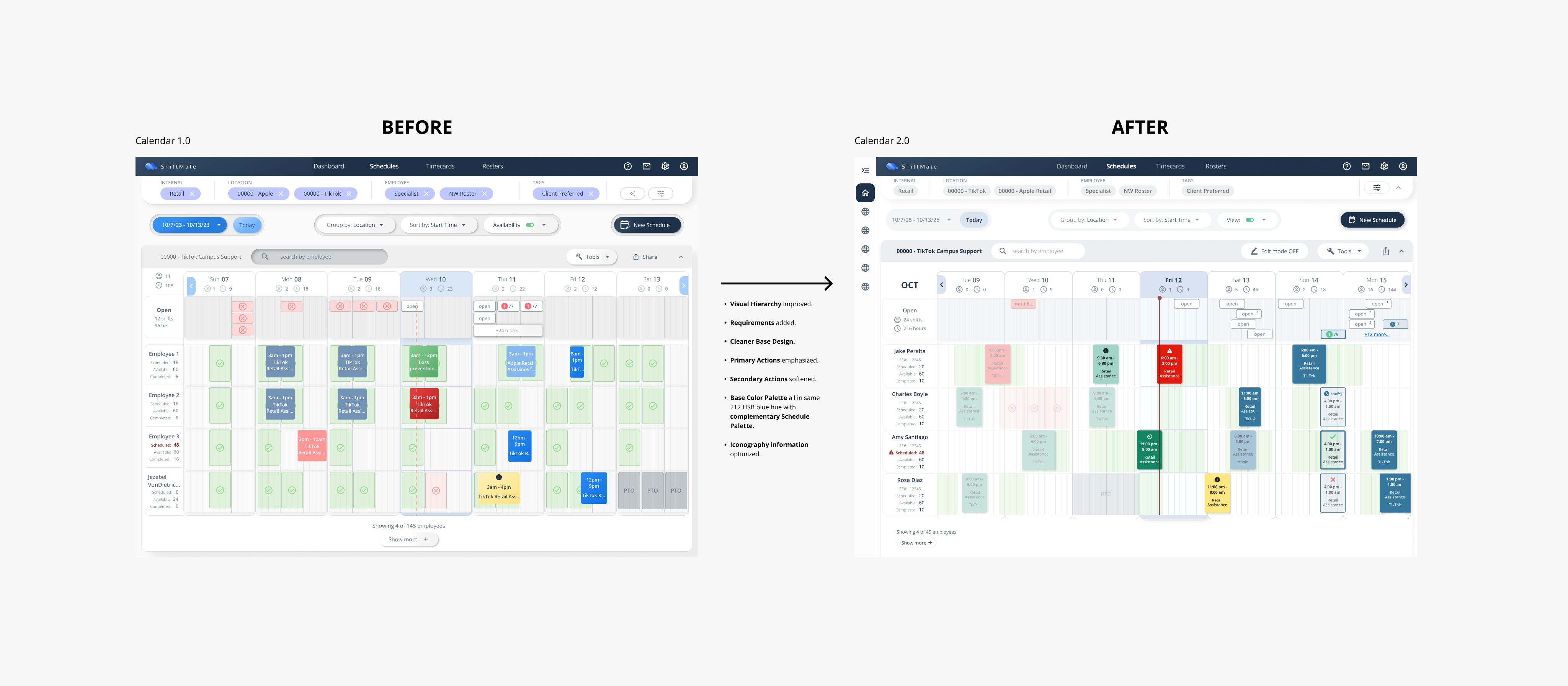
Step 1: Review Existing Calendar Design
There were good UX bones—but it needed further refinement and some UI love. 🪄
Some Takeaways:
- The interface needed a clear information hierarchy and was a bit visually 'noisy' so a user didn't know where to look first.
- Additional user tools and requirements needed to be added to the interface and optimized.
- Many designs were built without proper components.
- Palettes and components needed to be audited for accessibility.

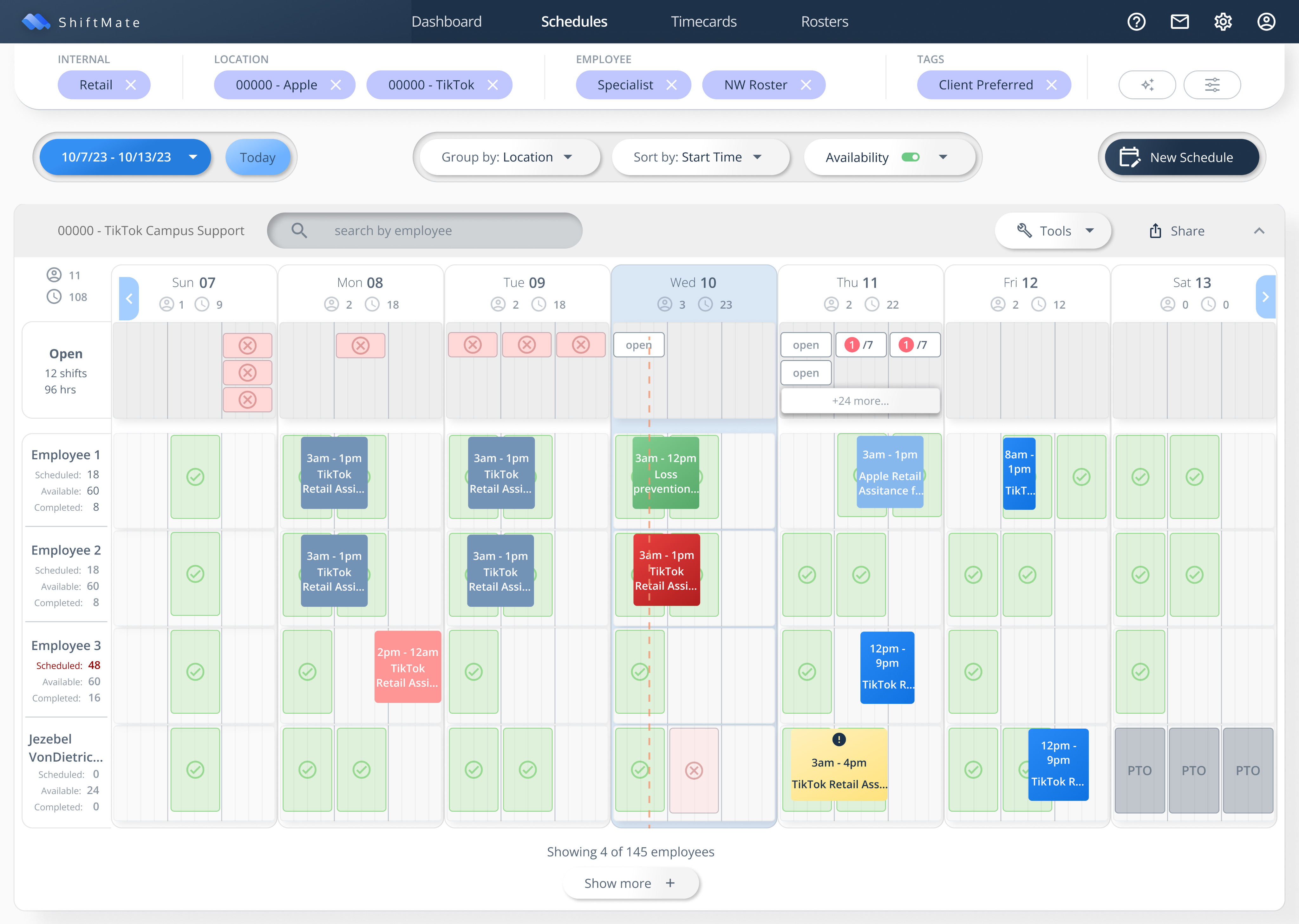
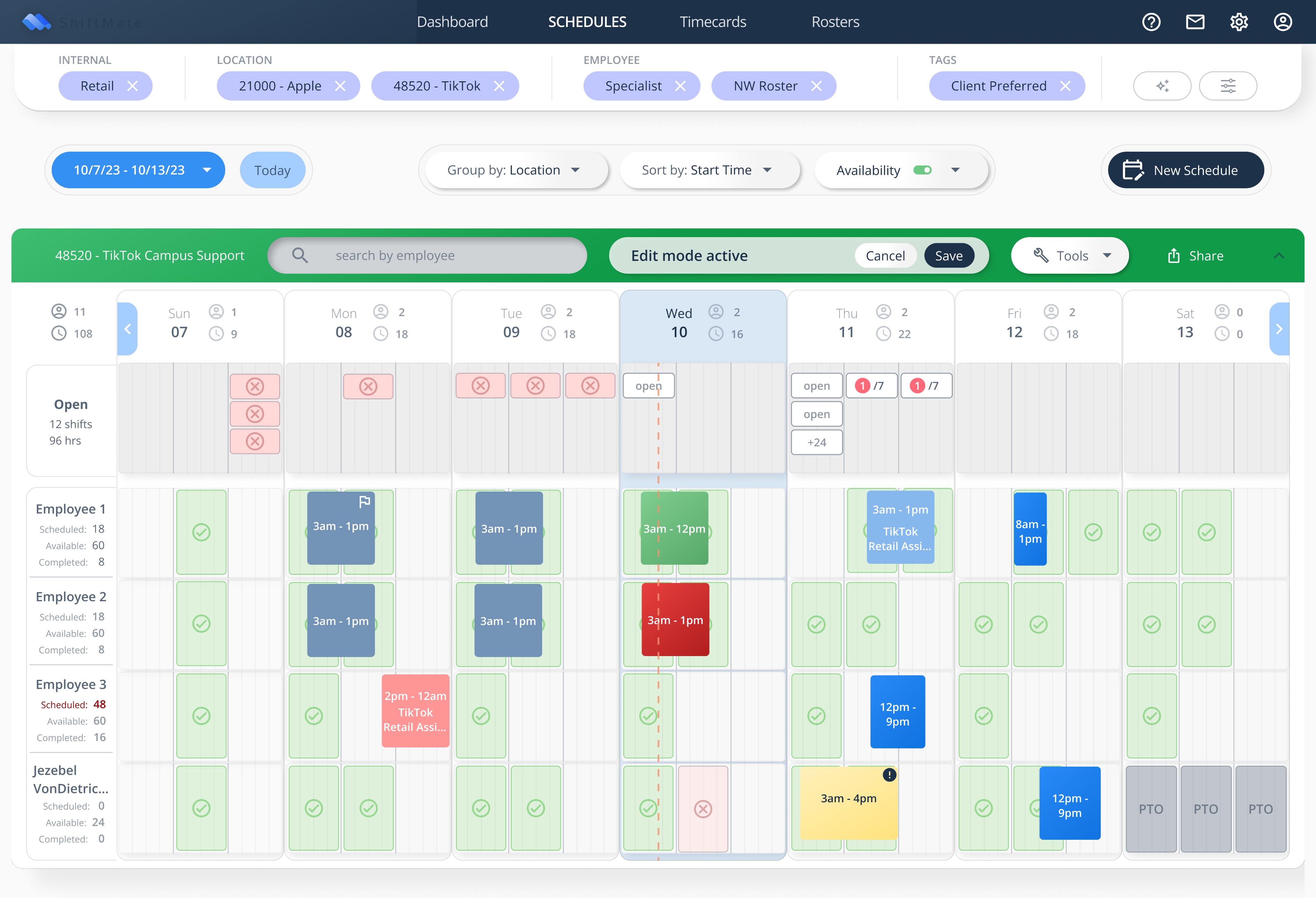
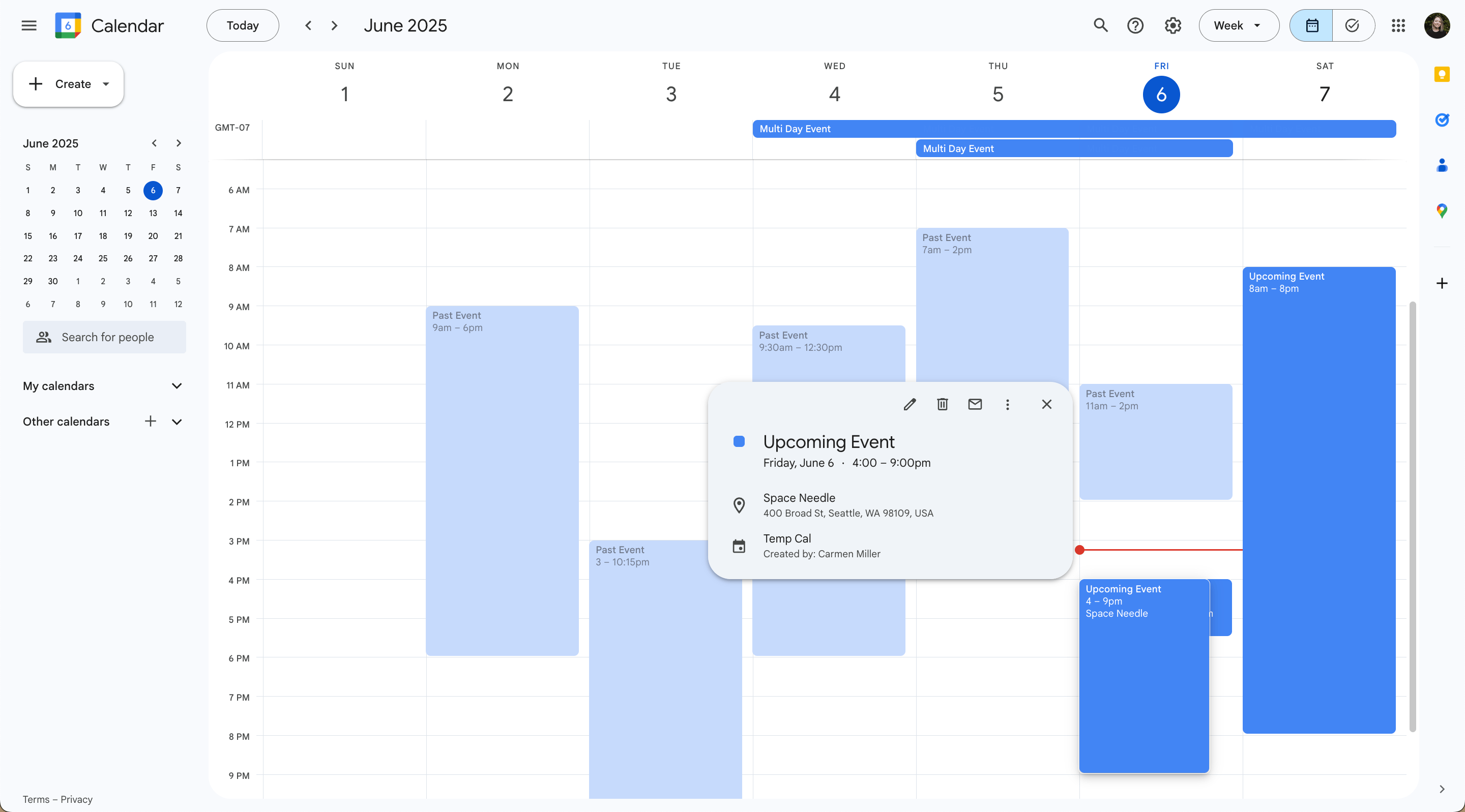
Step 2: Competitor Benchmarking
I used Google Calendar and the Google Suite as inspiration for how we might improve the interface and better prioritize information and actions on the scheduling calendar.
Though our requirements are (in some ways) more complex than the personal calendar management in GoogleCal, the simplicity and intuitiveness of GoogleCal was an excellent guide to help us simplify and prioritize our features.
Step 3:Simplify Visuals and Flesh Out Components
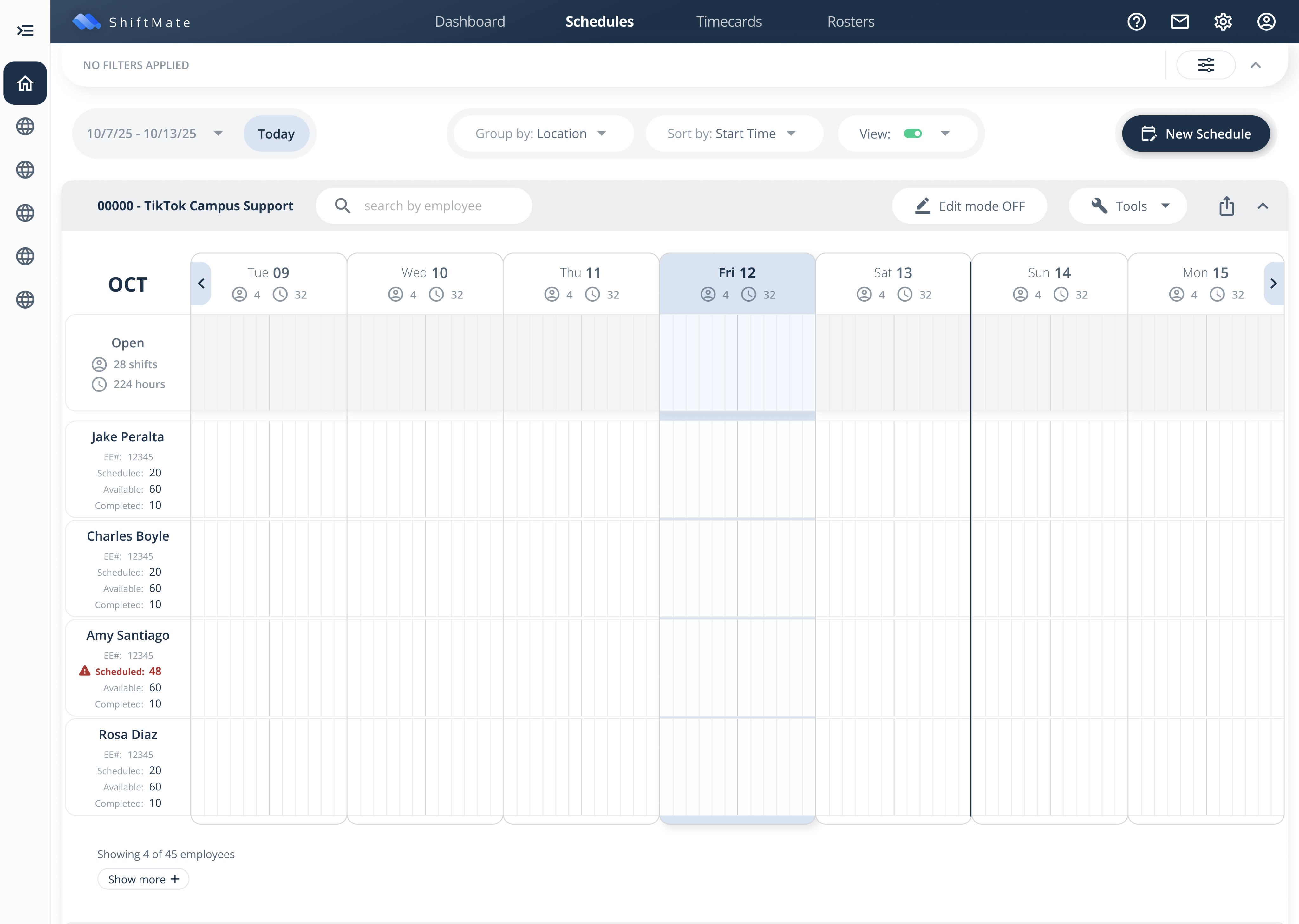
First, I needed to create a 'quieter' visual base, so that I could start to emphasize the primary actions.
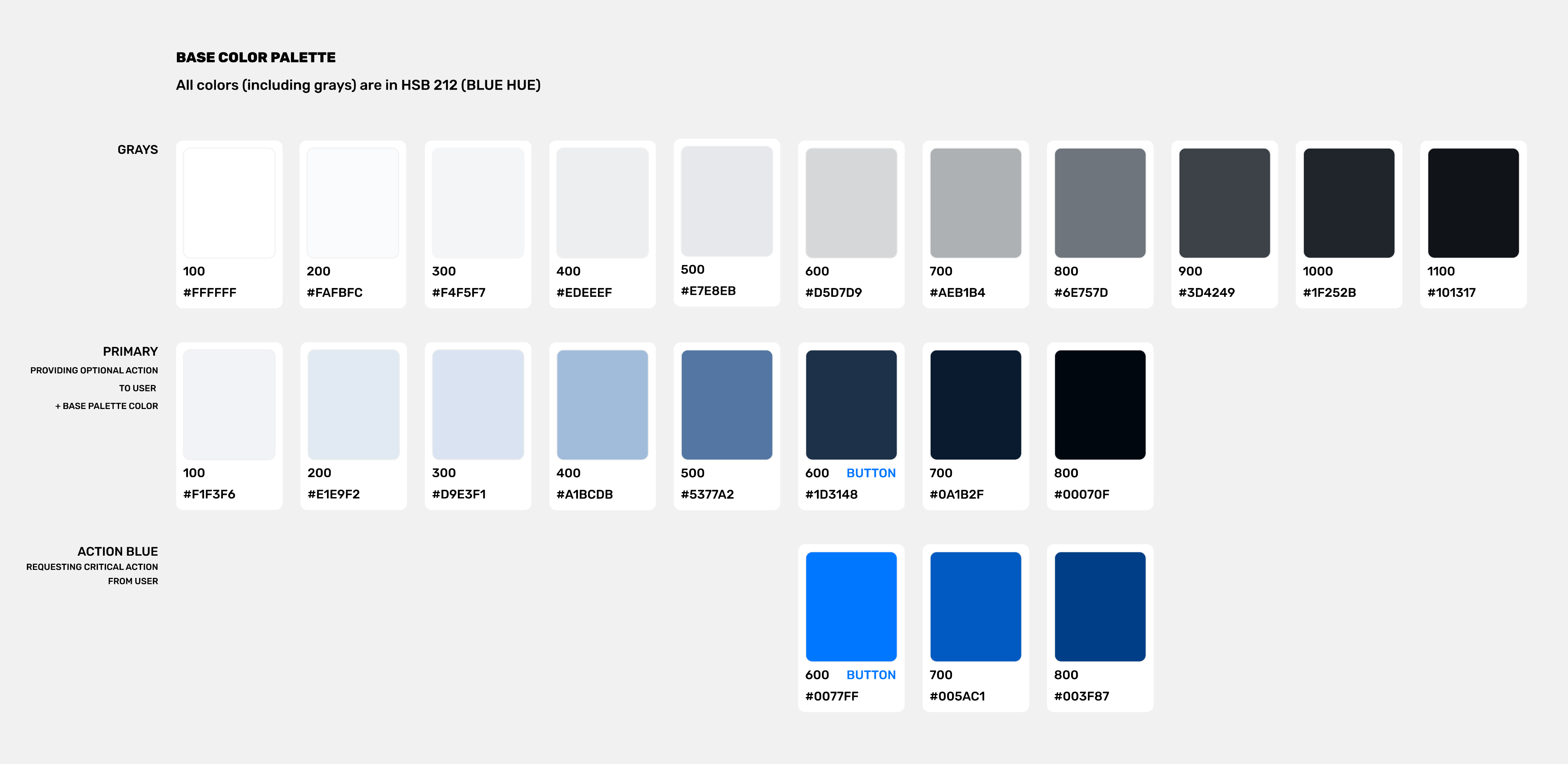
Using existing brand colors as the source, I created a design system color palette and laid down softer tones in the Calendar Base (see below).
I also established a system precedent of:
- Standardizing the use of colors in our design system—e.g. using our Dark Blue buttons to provide optional action, and our Bright Blue buttons to request critical action. (This precedent was critical to establish priority of action in the calendar.)
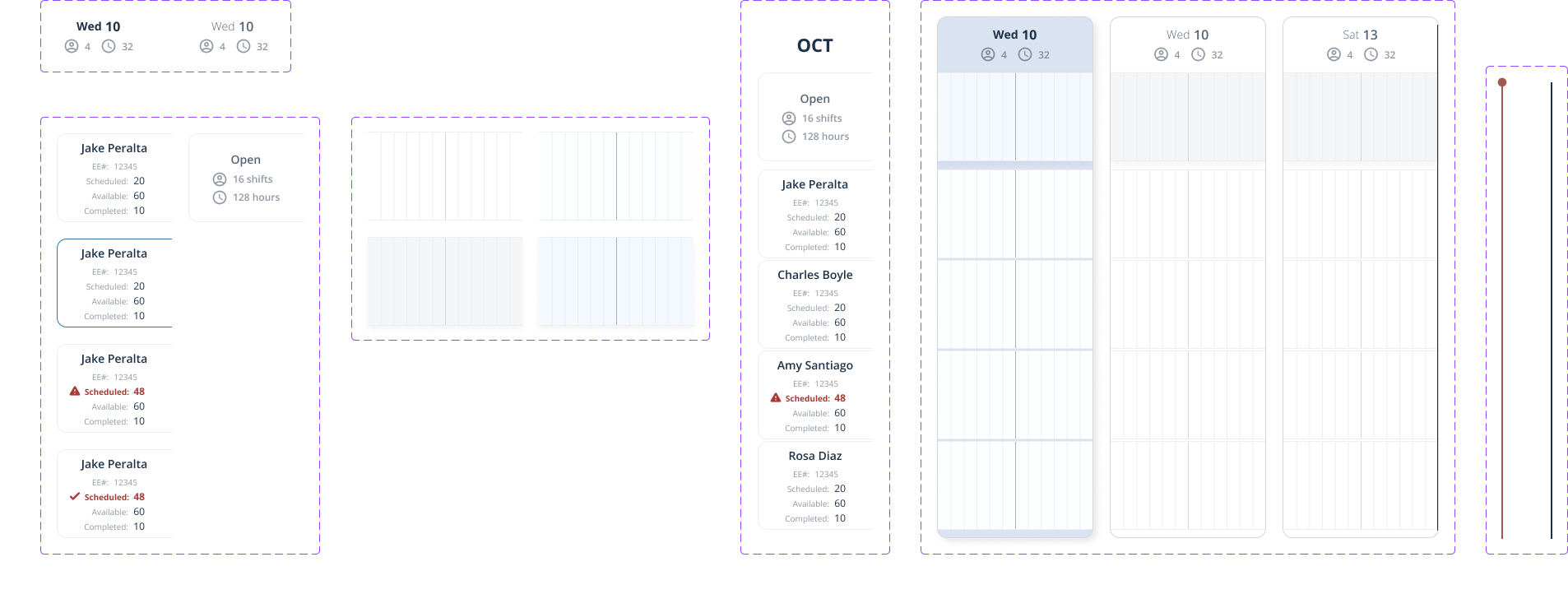
- Creating Components for all the building blocks of our designs to maintain consistency, reduce error, and avoid redoing work.
Step 4:Add Primary and Secondary Actions
SECONDARY
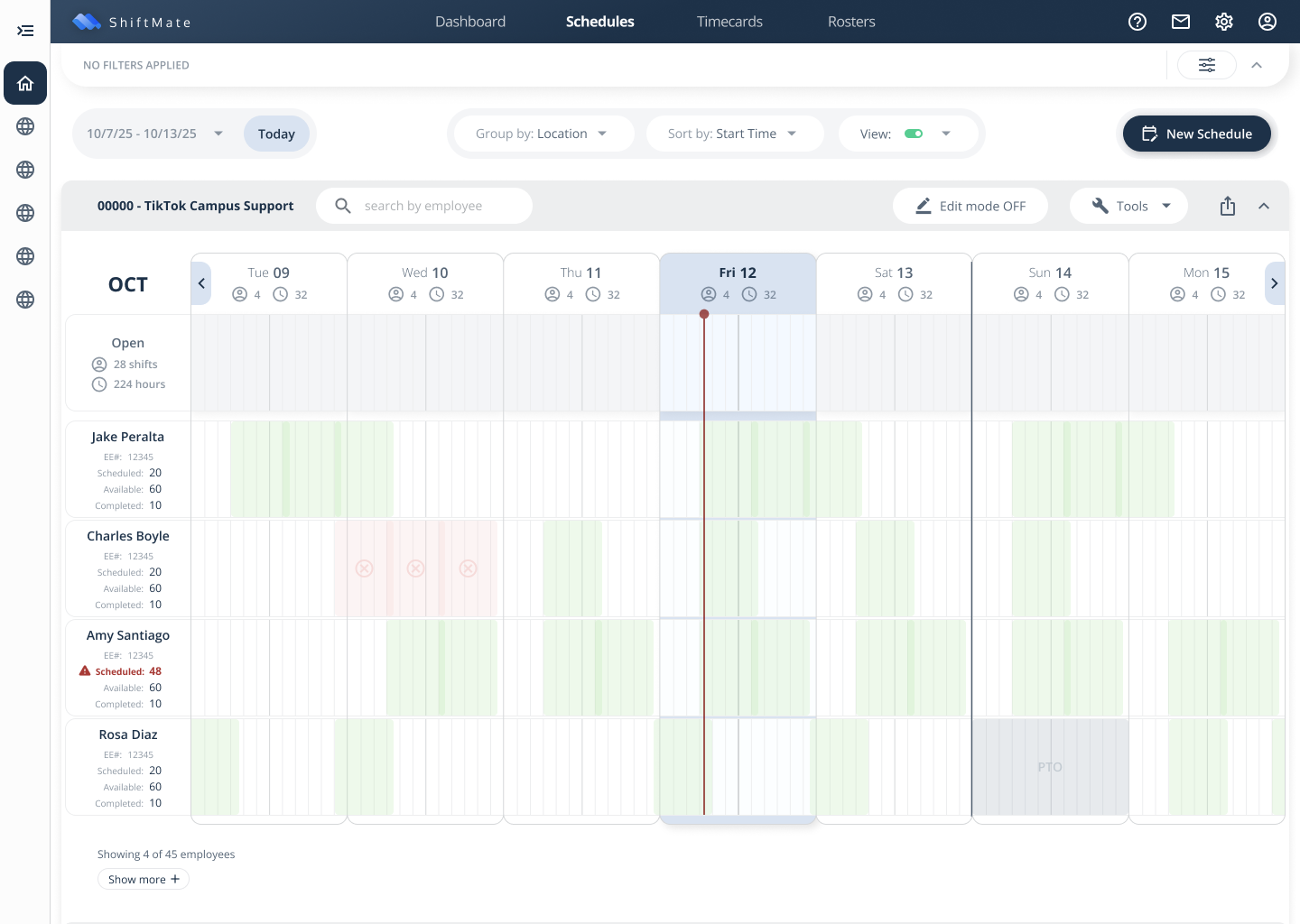
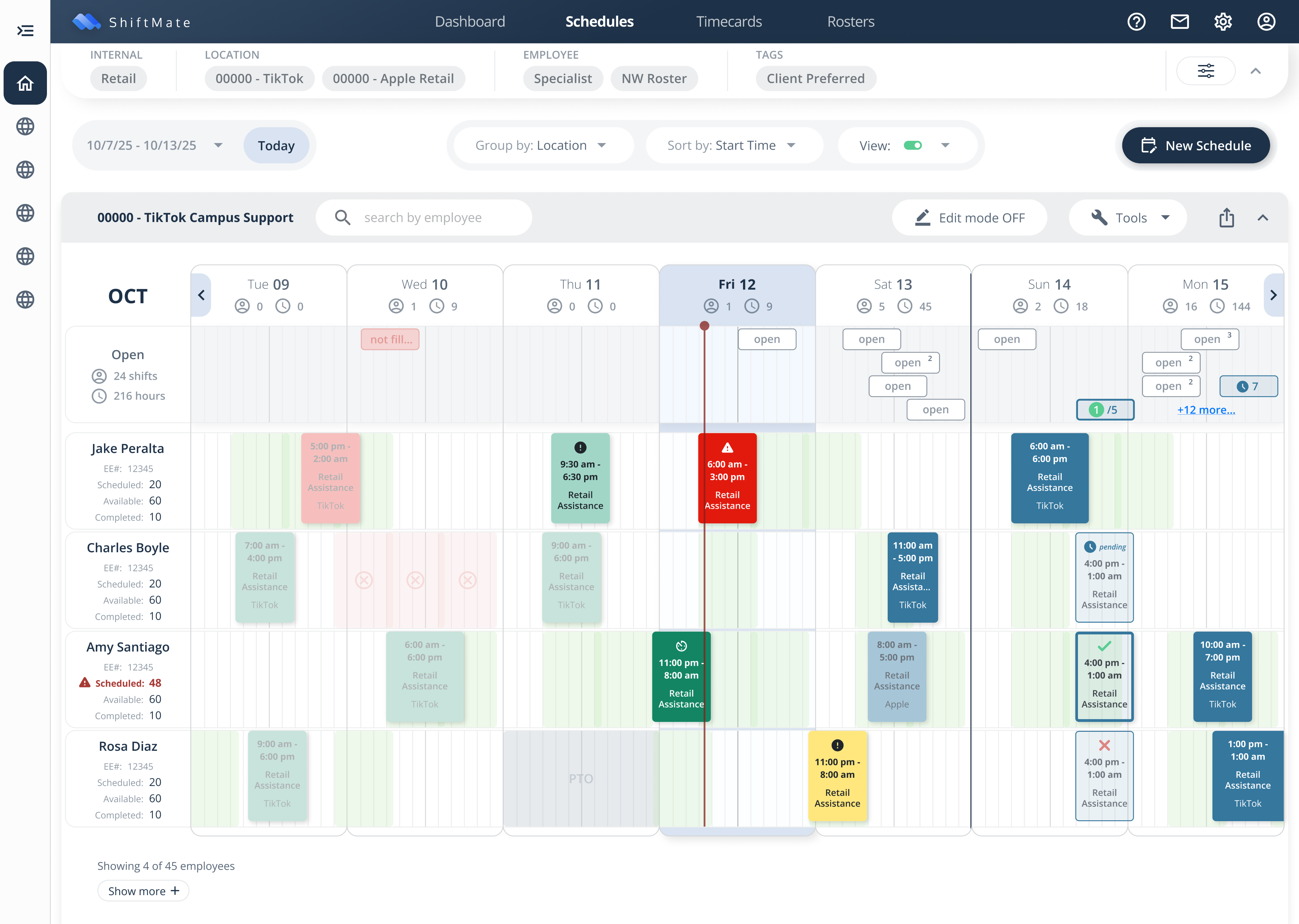
Supplementary information for schedulers is in the availability indicators:
- Employee-submitted availability in context of open shifts that still need to be scheduled took a process that would normally take multiple spreadsheets and phone calls to fill, and turned it into a quick drag-and-drop assignment completed in seconds.
- Design of the availability indicators was softened to provide context for the shift indicators (coming up next) without competing for visual hierarchy.
PRIMARY
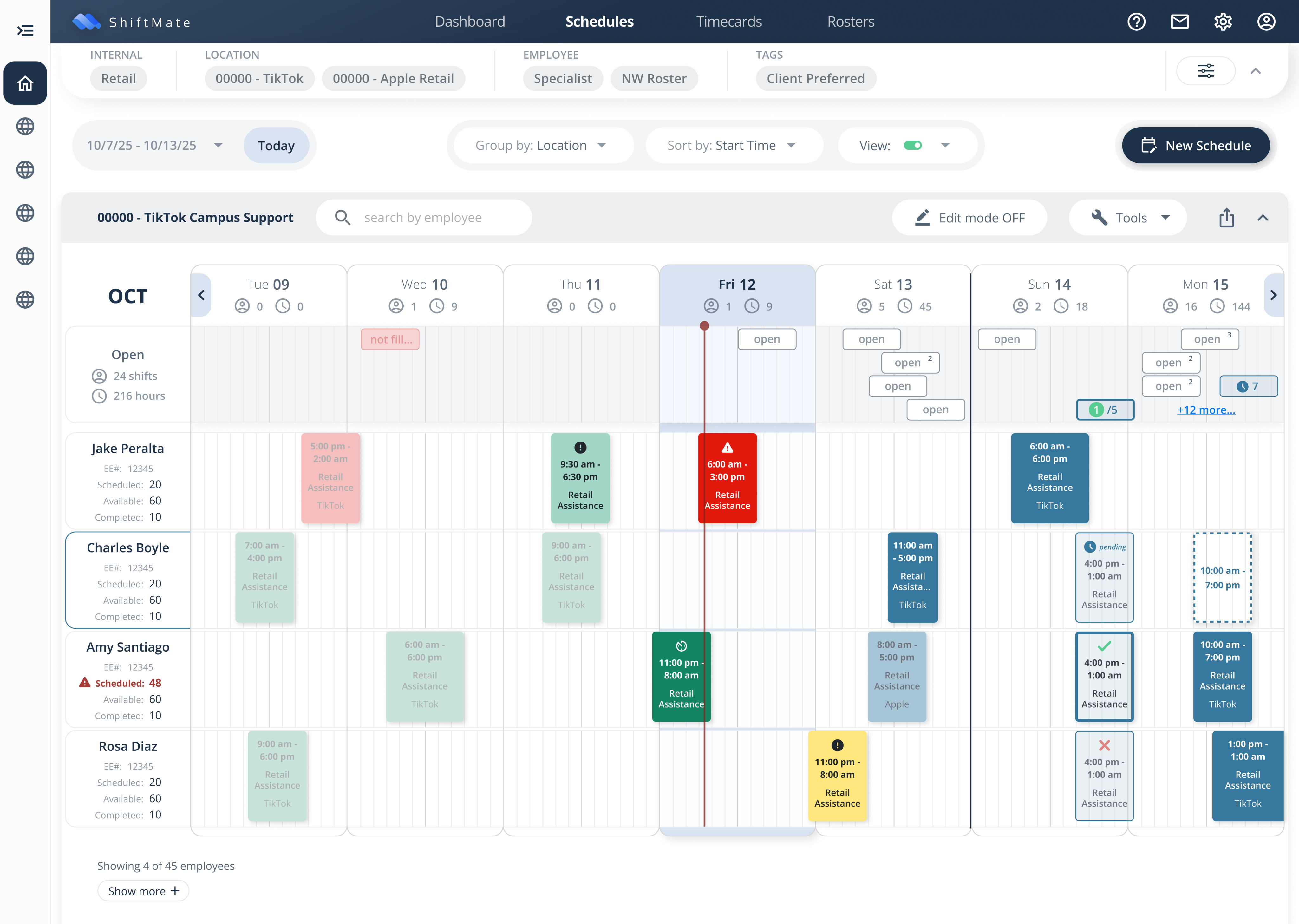
The most critical information and actions for schedulers are the shift indicators:
- Synthesizing shift data automatically (e.g. number of hours scheduled, worked, etc. OR the number of open shifts and hours still to be scheduled) would bring a massive ROI in efficiency and accuracy for scheduling.
- Establishing visual cues and states for an employee shift status (e.g. scheduled, clocked in, late, etc.) would be a huge load reduction for operations.
I created an updated palette and component set for shifts, including actions and states that hadn't yet been accounted for.
Iconography was also updated to support the meaning of the color states, and create visual distinction for those users with colorblindness.
Final Step:Apply Visual Precedent Across UI
A similar 'emphasize and soften' logic was applied across the board to:
- Buttons
- Filter Chips
- Tool Bars
- Menus & Icons
COMPLETED CALENDAR! All elements displayed with updated hierarchy (view in Figma)
BONUS ✨
Update Design-to-Dev Handoff Process
Very quickly in starting this role, it was apparent that an updated handoff process was needed.
Previously, dev-ready designs remained mixed with in-progress designs in Figma. Additionally, only some notes were available as a guide in a task management platform. This meant there was often redundant communication needed in project meetings to clarify meaning and context.
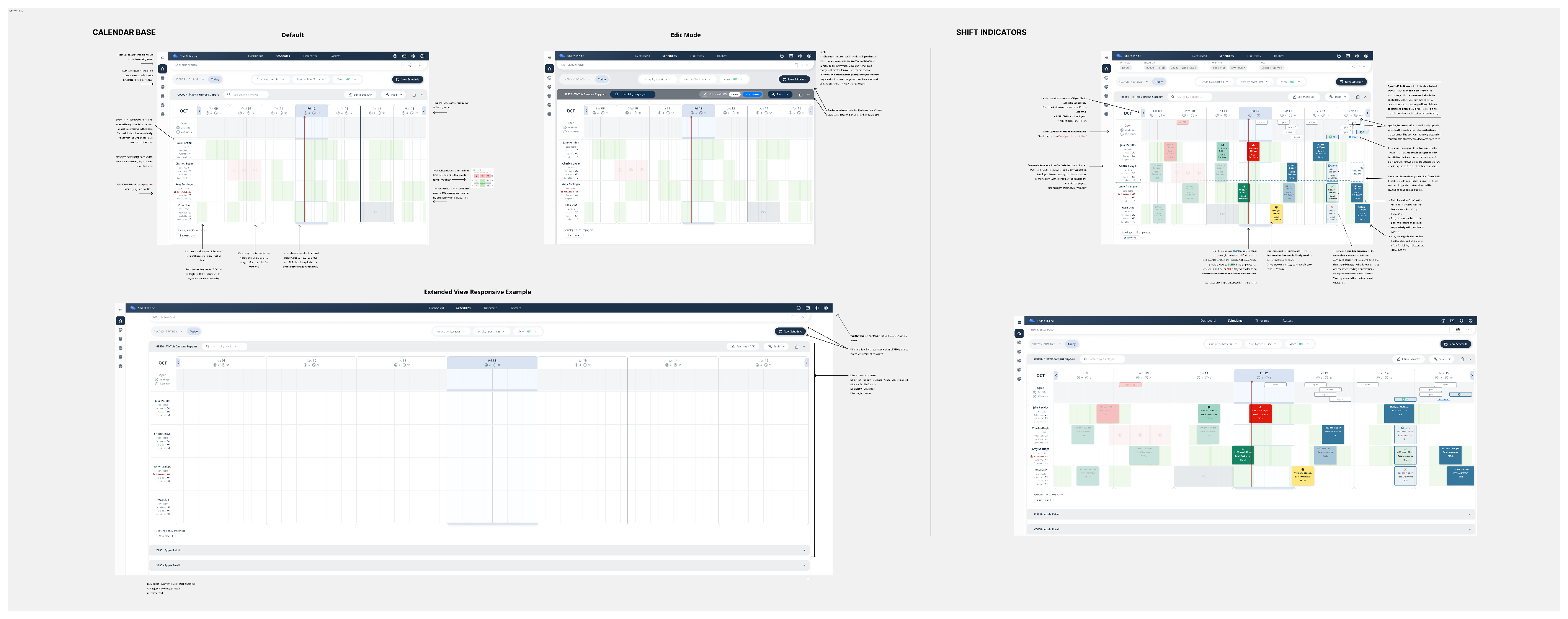
I created a separate local page specifically for Dev Handoff. The goal was that the Dev Team would ONLY ever need to reference the ‘Handoff Page’ and the ‘Component Library Page’ in Figma.
Dev Notes could be provided in context of the design and features for development could be separated by Phases for clarity.
Final Results ✓
- Updated & Standardized Design PrecedentDelivered the first Pilot Design System that could be spread to the whole family of products
- Bonus✨ Improved Handoffs & CommunicationPositive Dev feedback and reduced communication redundancy due to updated Handoff Process
- Bonus✨ Increased Accessibility Testing & AwarenessHad frequent conversations about accessibility practices with leadership, created accessibility guardrails, utilized Figma plugins to test contrast ratios and mimic different types of colorblindness to inform design best practices. Received constant positive feedback from a red-green colorblind colleague who was able to easily distinguish available actions for the first time in our development process.
Explore Designs in Figma 🔦
Next Steps
With more time to iterate and flesh out the work, I would have:
- Performed more User Surveys & TestingResearch was consistently being done with users and stakeholders to complete requirements and ensure all needs were considered.
- Completed a full Accessibility Audit for All ProductsLeadership and I were making plans to ensure accessibility best practices were implemented across products and were even considering implementing a large text, high-contrast accessibility mode along with a dark mode for products.
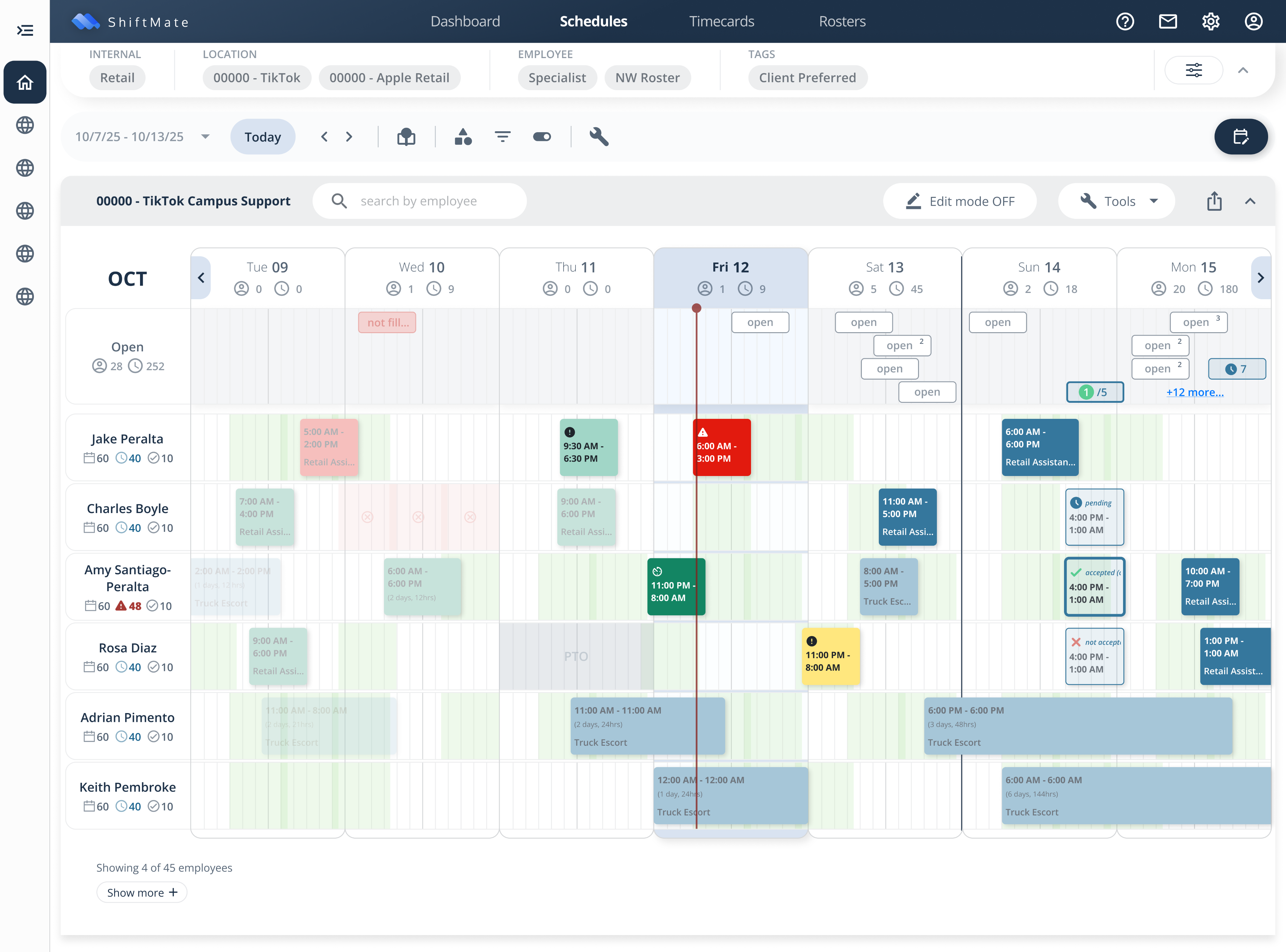
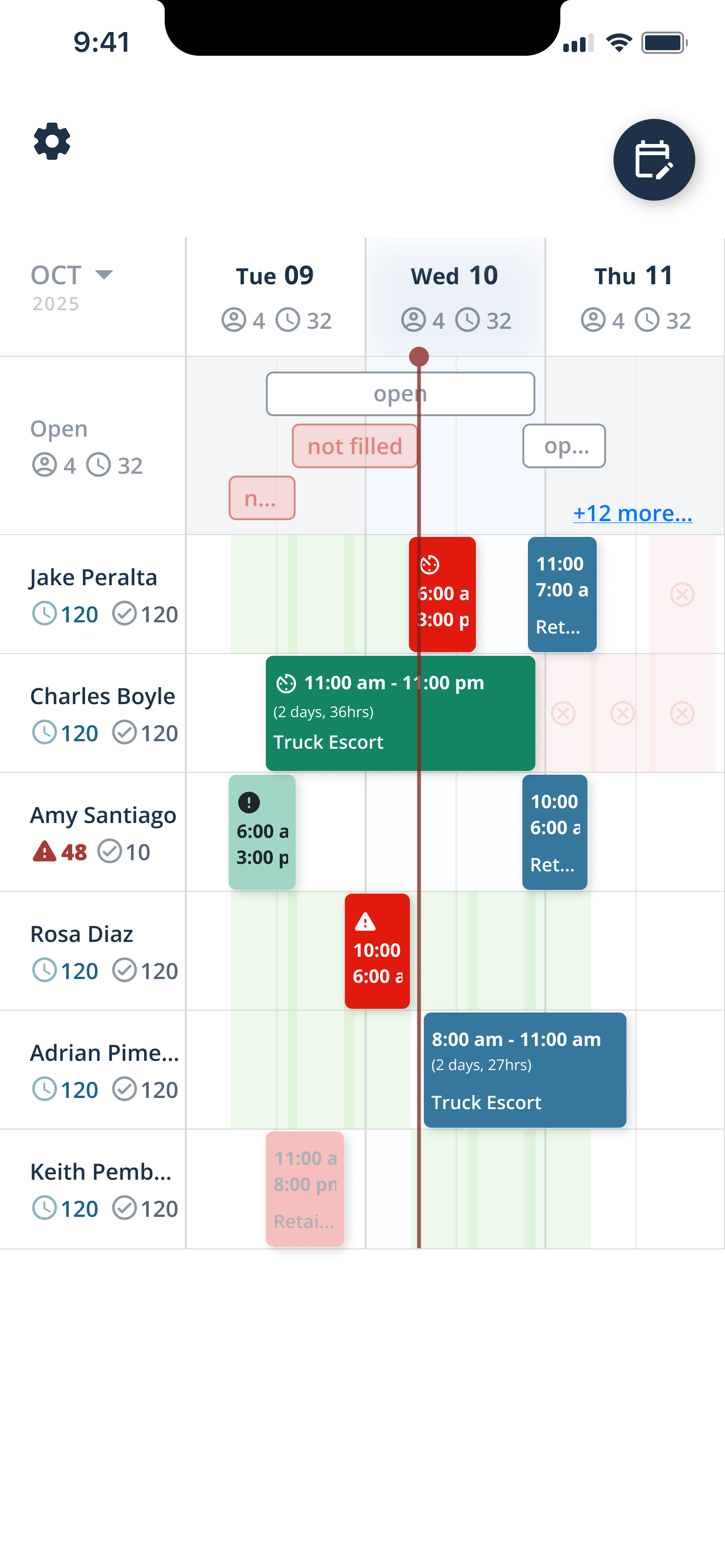
- Iterated Calendar with a ‘Mobile-First’ Approach (below)Mobile design had not yet been accounted for when I took on this role, but once the time was allotted in my workload, even just initial mockups for a mobile calendar changed my approach to the desktop calendar. Mobile design requires a more economical use of space and lead to more elegant solutions and a re-prioritization of tools and functions. Initial Results:- Updated Toolbar- Space Efficiency improved overall- Employee Rows condensed- Shift Indicators optimizedWith more time at SIS, I would have pitched something like this 'Calendar 3.0' below as an update to our approach.
Carmen R. Miller
Thoughtful Product Design
← Back
Summary
THE COMPANY
Security Industry Specialists (SIS) is a security company that schedules and manages thousands of personnel across the nation every day.
THE GOAL
I was brought in to take their custom scheduling tool, that had been in R&D for two years, across the finish line—to take the foundational design to a shippable product that could be successful with users.
Product Needs
Problem
- Visual Clutter →The interface was a bit visually 'noisy' so primary actions or information were not immediately clear to the user, increasing cognitive friction.
Solution
- Visual Hierarchy Refine UI visuals, emphasize the highest priority actions, and 'quiet down' the secondary actions to create clear visual hierarchy.
- Missing Components →Components (when they existed) were decentralized and mixed in with the page designs, making it difficult to know what standard building blocks existed and which precedent was most up-to-date.
- Centralized Component Structure Create a local 'component library' page to centralize all dev-ready components into one place, to create a single ‘source of truth’, to ensure clarity in handoff, and to support efficient future updates.
- Lack of Standardization →Critical design building blocks and standardized responsive breakpoints were not established across company products, which lead to redundant work for both Design and Dev, and an inconsistent experience for the user.
- Design System & Best Practices Create a more standardized design system that could be implemented in the current product and retroactively updated across other company tools to create a consistent experience across multiple products.
- Clunky Handoff Process →The system for handing off dev-ready designs was clunky and production designs were mixed in with the designs still in progress, creating status confusion and constant communication redundancy.
- Streamlined Handoff Process Create a clean and updated system for Design-to-Dev handoff with clear phases, sections, and detailed Dev notes. No blending of production-ready designs with works-in-progress.
“Carmen did an excellent job unifying the ...experience into an intuitive tool even for our less technical users. Additionally, she made the next steps as easy on our developers as possible ...creating the smoothest handoff process we’ve ever had.”
Patrick Clark, Director of Technology, SIS — read referral letter
Step 1: Review Existing Calendar Design
There were good UX bones—but it needed further refinement and some UI love. 🪄
Some Takeaways:
- The interface needed a clear information hierarchy and was a bit visually 'noisy' so a user didn't know where to look first.
- Additional user tools and requirements needed to be added to the interface and optimized.
- Many designs were built without proper components.
- Palettes and components needed to be audited for accessibility.
Step 2: Competitor Benchmarking
I used Google Calendar and the Google Suite as inspiration for how we might improve the interface and better prioritize information and actions on the scheduling calendar.
Though our requirements are (in some ways) more complex than the personal calendar management in GoogleCal, the simplicity and intuitiveness of GoogleCal was an excellent guide to help us simplify and prioritize our features.
Step 3:Simplify Visuals and Flesh Out Components
First, I needed to create a 'quieter' visual base, so that I could start to emphasize the primary actions.
Using existing brand colors as the source, I created a design system color palette and laid down softer tones in the Calendar Base (see below).
I also established a system precedent of:
- Standardizing the use of colors in our design system—e.g. using our Dark Blue buttons to provide optional action, and our Bright Blue buttons to request critical action. (This precedent was critical to establish priority of action in the calendar.)
- Creating Components for all the building blocks of our designs to maintain consistency, reduce error, and avoid redoing work.
Step 4:Add Primary and Secondary Actions
SECONDARY
Supplementary information for schedulers is in the availability indicators:
- Employee-submitted availability in context of open shifts that still need to be scheduled took a process that would normally take multiple spreadsheets and phone calls to fill, and turned it into a quick drag-and-drop assignment completed in seconds.
- Design of the availability indicators was softened to provide context for the shift indicators (coming up next) without competing for visual hierarchy.
PRIMARY
The most critical information and actions for schedulers are the shift indicators:
- Synthesizing shift data automatically (e.g. number of hours scheduled, worked, etc. OR the number of open shifts and hours still to be scheduled) would bring a massive ROI in efficiency and accuracy for scheduling.
- Establishing visual cues and states for an employee shift status (e.g. scheduled, clocked in, late, etc.) would be a huge load reduction for operations.
I created an updated palette and component set for shifts, including actions and states that hadn't yet been accounted for.
Iconography was also updated to support the meaning of the color states, and create visual distinction for those users with colorblindness.
Final Step:Apply Visual Precedent Across UI
A similar 'emphasize and soften' logic was applied across the board to:
- Buttons
- Filter Chips
- Tool Bars
- Menus & Icons
COMPLETED CALENDAR! All elements displayed with updated hierarchy (view in Figma)
BONUS ✨
Update Design-to-Dev Handoff Process
Very quickly in starting this role, it was apparent that an updated handoff process was needed.
Previously, dev-ready designs remained mixed with in-progress designs in Figma. Additionally, only some notes were available as a guide in a task management platform. This meant there was often redundant communication needed in project meetings to clarify meaning and context.
I created a separate local page specifically for Dev Handoff. The goal was that the Dev Team would ONLY ever need to reference the ‘Handoff Page’ and the ‘Component Library Page’ in Figma.
Dev Notes could be provided in context of the design and features for development could be separated by Phases for clarity.
Final Results ✓
- Updated & Standardized Design PrecedentDelivered the first Pilot Design System that could be spread to the whole family of products
- Bonus✨ Improved Handoffs & CommunicationPositive Dev feedback and reduced communication redundancy due to updated Handoff Process
- Bonus✨ Increased Accessibility Testing & AwarenessHad frequent conversations about accessibility practices with leadership, created accessibility guardrails, utilized Figma plugins to test contrast ratios and mimic different types of colorblindness to inform design best practices. Received constant positive feedback from a red-green colorblind colleague who was able to easily distinguish available actions for the first time in our development process.
Explore Designs in Figma 🔦
Next Steps
With more time to iterate and flesh out the work, I would have:
- Performed more User Surveys & TestingResearch was consistently being done with users and stakeholders to complete requirements and ensure all needs were considered.
- Completed a full Accessibility Audit for All ProductsLeadership and I were making plans to ensure accessibility best practices were implemented across products and were even considering implementing a large text, high-contrast accessibility mode along with a dark mode for products.
- Iterated Calendar with a ‘Mobile-First’ Approach (below)Mobile design had not yet been accounted for when I took on this role, but once the time was allotted in my workload, even just initial mockups for a mobile calendar changed my approach to the desktop calendar. Mobile design requires a more economical use of space and lead to more elegant solutions and a re-prioritization of tools and functions. Initial Results:- Updated Toolbar- Space Efficiency improved overall- Employee Rows condensed- Shift Indicators optimizedWith more time at SIS, I would have pitched something like this 'Calendar 3.0' below as an update to our approach.
Carmen R. Miller
Thoughtful Product Design
← Back
Summary
THE COMPANY
Security Industry Specialists (SIS) is a security company that schedules and manages thousands of personnel across the nation every day.
THE GOAL
I was brought in to take their custom scheduling tool, that had been in R&D for two years, across the finish line—to take the foundational design to a shippable product that could be successful with users.
Product Needs
Problem
- Visual Clutter →The interface was a bit visually 'noisy' so primary actions or information were not immediately clear to the user, increasing cognitive friction.
Solution
- Visual Hierarchy Refine UI visuals, emphasize the highest priority actions, and 'quiet down' the secondary actions to create clear visual hierarchy.
- Missing Components →Components (when they existed) were decentralized and mixed in with the page designs, making it difficult to know what standard building blocks existed and which precedent was most up-to-date.
- Centralized Component Structure Create a local 'component library' page to centralize all dev-ready components into one place, to create a single ‘source of truth’, to ensure clarity in handoff, and to support efficient future updates.
- Lack of Standardization →Critical design building blocks and standardized responsive breakpoints were not established across company products, which lead to redundant work for both Design and Dev, and an inconsistent experience for the user.
- Design System & Best Practices Create a more standardized design system that could be implemented in the current product and retroactively updated across other company tools to create a consistent experience across multiple products.
- Clunky Handoff Process →The system for handing off dev-ready designs was clunky and production designs were mixed in with the designs still in progress, creating status confusion and constant communication redundancy.
- Streamlined Handoff Process Create a clean and updated system for Design-to-Dev handoff with clear phases, sections, and detailed Dev notes. No blending of production-ready designs with works-in-progress.
“Carmen did an excellent job unifying the ...experience into an intuitive tool even for our less technical users. Additionally, she made the next steps as easy on our developers as possible ...creating the smoothest handoff process we’ve ever had.”
Patrick Clark, Director of Technology, SIS — read referral letter
Step 1: Review Existing Calendar Design
There were good UX bones—but it needed further refinement and some UI love. 🪄
Some Takeaways:
- The interface needed a clear information hierarchy and was a bit visually 'noisy' so a user didn't know where to look first.
- Additional user tools and requirements needed to be added to the interface and optimized.
- Many designs were built without proper components.
- Palettes and components needed to be audited for accessibility.
Step 2: Competitor Benchmarking
I used Google Calendar and the Google Suite as inspiration for how we might improve the interface and better prioritize information and actions on the scheduling calendar.
Though our requirements are (in some ways) more complex than the personal calendar management in GoogleCal, the simplicity and intuitiveness of GoogleCal was an excellent guide to help us simplify and prioritize our features.
Step 3:Simplify Visuals and Flesh Out Components
First, I needed to create a 'quieter' visual base, so that I could start to emphasize the primary actions.
Using existing brand colors as the source, I created a design system color palette and laid down softer tones in the Calendar Base (see below).
I also established a system precedent of:
- Standardizing the use of colors in our design system—e.g. using our Dark Blue buttons to provide optional action, and our Bright Blue buttons to request critical action. (This precedent was critical to establish priority of action in the calendar.)
- Creating Components for all the building blocks of our designs to maintain consistency, reduce error, and avoid redoing work.
Step 4:Add Primary and Secondary Actions
SECONDARY
Supplementary information for schedulers is in the availability indicators:
- Employee-submitted availability in context of open shifts that still need to be scheduled took a process that would normally take multiple spreadsheets and phone calls to fill, and turned it into a quick drag-and-drop assignment completed in seconds.
- Design of the availability indicators was softened to provide context for the shift indicators (coming up next) without competing for visual hierarchy.
PRIMARY
The most critical information and actions for schedulers are the shift indicators:
- Synthesizing shift data automatically (e.g. number of hours scheduled, worked, etc. OR the number of open shifts and hours still to be scheduled) would bring a massive ROI in efficiency and accuracy for scheduling.
- Establishing visual cues and states for an employee shift status (e.g. scheduled, clocked in, late, etc.) would be a huge load reduction for operations.
I created an updated palette and component set for shifts, including actions and states that hadn't yet been accounted for.
Iconography was also updated to support the meaning of the color states, and create visual distinction for those users with colorblindness.
Final Step:Apply Visual Precedent Across UI
A similar 'emphasize and soften' logic was applied across the board to:
- Buttons
- Filter Chips
- Tool Bars
- Menus & Icons
COMPLETED CALENDAR! All elements displayed with updated hierarchy (view in Figma)
BONUS ✨
Update Design-to-Dev Handoff Process
Very quickly in starting this role, it was apparent that an updated handoff process was needed.
Previously, dev-ready designs remained mixed with in-progress designs in Figma. Additionally, only some notes were available as a guide in a task management platform. This meant there was often redundant communication needed in project meetings to clarify meaning and context.
I created a separate local page specifically for Dev Handoff. The goal was that the Dev Team would ONLY ever need to reference the ‘Handoff Page’ and the ‘Component Library Page’ in Figma.
Dev Notes could be provided in context of the design and features for development could be separated by Phases for clarity.
Final Results ✓
- Updated & Standardized Design PrecedentDelivered the first Pilot Design System that could be spread to the whole family of products
- Bonus✨ Improved Handoffs & CommunicationPositive Dev feedback and reduced communication redundancy due to updated Handoff Process
- Bonus✨ Increased Accessibility Testing & AwarenessHad frequent conversations about accessibility practices with leadership, created accessibility guardrails, utilized Figma plugins to test contrast ratios and mimic different types of colorblindness to inform design best practices. Received constant positive feedback from a red-green colorblind colleague who was able to easily distinguish available actions for the first time in our development process.
Explore Designs in Figma 🔦
Next Steps
With more time to iterate and flesh out the work, I would have:
- Performed more User Surveys & TestingResearch was consistently being done with users and stakeholders to complete requirements and ensure all needs were considered.
- Completed a full Accessibility Audit for All ProductsLeadership and I were making plans to ensure accessibility best practices were implemented across products and were even considering implementing a large text, high-contrast accessibility mode along with a dark mode for products.
- Iterated Calendar with a ‘Mobile-First’ Approach (below)Mobile design had not yet been accounted for when I took on this role, but once the time was allotted in my workload, even just initial mockups for a mobile calendar changed my approach to the desktop calendar. Mobile design requires a more economical use of space and lead to more elegant solutions and a re-prioritization of tools and functions. Initial Results:- Updated Toolbar- Space Efficiency improved overall- Employee Rows condensed- Shift Indicators optimizedWith more time at SIS, I would have pitched something like this 'Calendar 3.0' below as an update to our approach.